Teacher Photo Frame Laser Cut File: A Strategic Guide to Meaningful Classroom Keepsakes
In the realm of educational gifts and classroom memorabilia, few items carry as much emotional weight or practical value as a personalized teacher photo frame. The Teacher Photo Frame Laser Cut File represents a specific intersection of digital design, manufacturing precision, and sentimental expression. Unlike generic store-bought frames, this digital asset allows educators, parents, and students to create a layered, dimensional keepsake that honors the unique relationship between a student and their mentor. Understanding how to integrate this file into your creative workflow ensures that the final product is not just a decoration, but a high-quality artifact that withstands the test of time.
Understanding the Asset and Its Workflow Position
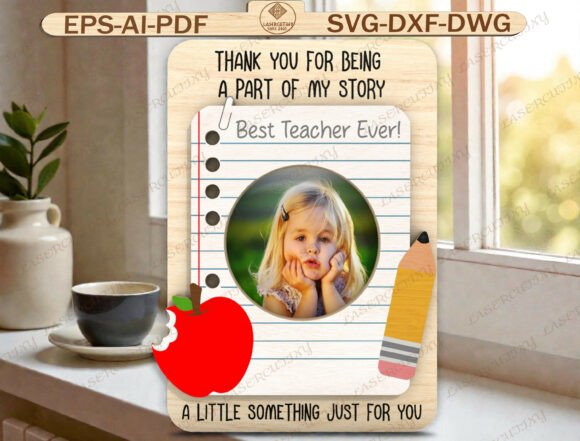
The Teacher Photo Frame Laser Cut File is a digital download comprising multiple vector formats (SVG, DXF, AI, EPS, PDF, DWG). It is designed to simulate the aesthetic of a lined notebook page, complete with pencil and apple accents. This design is not merely a flat image; it is a layered construction intended for laser cutting or CNC routing. In a production workflow, this file serves as the blueprint for physical creation. It sits at the critical juncture between digital planning and physical assembly.
For professionals utilizing tools like Glowforge, xTool, OMTech, or Thunder Laser CNC routers, this file eliminates the need for manual tracing or complex CAD modeling. Instead, it provides pre-optimized geometry ready for immediate import. The layered nature of the design dictates a specific assembly process where individual cut pieces are stacked to create depth. This dimensionality transforms a simple wooden or acrylic sheet into a tactile object that feels substantial and thoughtfully crafted. The inclusion of phrases such as "Thank you for being a part of my story", "Best Teacher Ever", and "A little something just for you" adds a narrative layer that elevates the item from a craft project to a meaningful gesture.
Preparation and Material Selection
Before initiating the cutting process, proper preparation is essential for a successful outcome. The choice of material directly impacts the visual appeal and durability of the final frame. For a design inspired by a notebook, light-colored woods like birch or maple provide an excellent canvas, mimicking the clean look of paper. Alternatively, acrylic offers a modern, translucent quality that can make the pencil and apple accents pop when backlit.
When preparing the machine, users must account for the layered structure. Unlike single-layer cuts, this project requires precise alignment (registration) if using different materials for different layers. If working with a single material, the focus shifts to selecting the appropriate thickness. Typically, 3mm to 6mm material works best for maintaining structural integrity while allowing for detailed cuts in the "lined" sections. Ensuring the material is flat and free of warping is crucial; any unevenness will disrupt the stacking process and compromise the dimensional effect.
Integration Across Creative and Professional Workflows
This digital asset is versatile enough to fit into various workflows, ranging from hobbyist crafting to small business production lines. The integration strategy depends on the user's goals and the scale of the operation.
For Hobbyists and DIY Enthusiasts
For individuals creating gifts for personal connections, the workflow is linear and focused on execution. The process begins with downloading the files compatible with software like Cricut Design Space or Silhouette Studio. Once imported, the user arranges the layers according to the design specifications. The key here is efficiency; since the file includes all necessary elements, the setup time is minimal. Users can then proceed to cut the pieces, sand them lightly to remove burrs, and assemble the frame. Adding a student photo is the final step, turning the object into a personalized memento. This workflow is ideal for Teacher Appreciation Week, end-of-year gifts, or Christmas surprises, where timing and personalization are paramount.
For Small Business Owners and Creators
Entrepreneurs selling handmade goods can leverage the Teacher Photo Frame Laser Cut File to streamline their inventory management. By purchasing a license to use these digital assets, a business owner can produce consistent, high-quality frames without investing hours in design work. The compatibility with major CNC platforms means that production can be scaled up quickly. A business workflow might involve batch cutting multiple units during off-peak hours, organizing the parts by size, and setting up an assembly station where photos are added before packaging.
Consistency is vital in a commercial context. Because the source file is standardized, every unit produced maintains the same dimensions and aesthetic quality. This reliability builds trust with customers who expect a premium finish. Furthermore, the ability to offer customization—such as changing the text color or swapping the background material—allows businesses to cater to diverse client needs without altering the core design logic.
Technical Compatibility and Software Integration
A significant advantage of this resource is its broad compatibility. The inclusion of SVG, DXF, AI, EPS, PDF, and DWG formats ensures that users across different software ecosystems can utilize the design. Whether you are a professional designer using Adobe Illustrator or a maker relying on open-source tools, the file adapts to your environment.
When importing these files, attention should be paid to scaling. Vector files often come in arbitrary units, so verifying the dimensions against your material size is a necessary step. Most laser cutting software allows for quick scaling adjustments, but checking the "lines per inch" or resolution settings ensures that the fine details of the notebook lines and pencil tips remain crisp. For users operating flatbed lasers, the nesting capabilities of the software can help maximize material usage by arranging the frame components efficiently on the bed.
Optimization for Different Materials
Different materials require different laser settings. Wood may require slower speeds and higher power to achieve a deep engrave or clean cut, whereas acrylic often benefits from faster speeds and lower power to prevent melting or scorching. The layered design implies that some elements might be engraved rather than cut through, adding texture to the surface. Adjusting the power settings for engraving versus cutting is a critical technical skill that ensures the "pencil" and "apple" accents appear distinct from the main frame border.
Strategic Use Cases and Timing
The utility of the Teacher Photo Frame Laser Cut File extends beyond a single moment in time. While it is perfectly suited for specific events like Back to School surprises or End of School Year celebrations, its versatility allows for year-round application.
- Teacher Appreciation Week: This is the primary use case. The sentiment of gratitude is heightened during this week, making a handmade gift particularly impactful. The workflow involves rapid production to meet the deadline of the event.
- End of School Year: As the academic year concludes, teachers receive numerous gifts. A personalized frame stands out because it captures a specific memory (the student photo) alongside a universal message of thanks.
- Preschool and Elementary Gifts: Younger students often lack the motor skills to create complex crafts. Parents or older siblings can utilize this file to create a sophisticated-looking gift that reflects the child's effort, even if the actual labor was done by an adult.
- Christmas and Holiday Surprises: During the holiday season, this frame serves as a thoughtful alternative to generic ornaments. The notebook theme aligns well with the start of a new semester or the reflection of past achievements.
Quality Control and Long-Term Value
Creating a lasting keepsake requires rigorous quality control. After cutting, each piece should be inspected for debris or incomplete cuts. Sanding the edges smooths out any roughness, ensuring the frame feels pleasant to the touch. When assembling the layers, using strong adhesive or small pins is recommended to keep the stack aligned over time. The goal is to create an object that does not warp or separate after years of display.
The longevity of the project also depends on the storage of the digital files. Keeping the original SVG or DXF files organized allows for future reprints or modifications. If a teacher moves to a new school or a student graduates and returns for a visit, the ability to print another copy of the frame or add a new photo ensures the gift remains relevant. This adaptability makes the digital file a valuable asset in a personal library of creative resources.
Final Thoughts on Implementation
The Teacher Photo Frame Laser Cut File is more than just a set of instructions; it is a tool for connection. By understanding the technical requirements and integrating the file into a structured workflow, creators can produce gifts that are both beautiful and deeply personal. Whether used by a parent looking to express gratitude or a small business owner expanding their product line, the combination of precise digital design and heartfelt messaging creates an outcome that resonates. The process of cutting, assembling, and framing a photo becomes a ritual of appreciation, transforming raw materials into a treasured memory of the educational journey.
Ultimately, the success of this project lies in the attention to detail. From selecting the right material to ensuring the layers sit flush, every step contributes to the final impression. By following a disciplined approach to implementation, the resulting Teacher Photo Frame becomes a symbol of respect and love, perfectly capturing the essence of the phrase, "Thank you for being a part of my story."